 paintqr
The smallest QR code you can print
A plain QR code holding a short link prints at about 1.5 cm across, white margin included. A code whose squares draw a picture starts at 3 cm and needs 8.5 cm at the highest detail.
The size of one square
The size of each square limits how small a code can be printed. In our tests with an iPhone and an Android phone at arm's length under room light, plain black-and-white codes read down to about 0.4 mm per square.
PaintQR makes codes whose squares draw a picture. Those needed about 0.6 mm per square: the picture uses part of the code's error correction, its ability to repair misread squares, so more of the squares have to be read correctly.
These are minimums: for an older phone, a dim room or ink that spreads, print larger.
Minimum widths by level of detail
The number of squares follows from how much the code holds and how fine a picture it draws. The PaintQR maker's 'Detail' setting fixes that number, and each of its four levels has a minimum width. It is the squares across, including the blank margin of four squares on every side, multiplied by 0.4 mm for a plain code or 0.6 mm for a picture code and rounded up to the next half centimetre.
A picture code at Max has the most squares and is the table's only estimate. It failed in our tests at 0.5 mm per square and has not been tested larger, so until a print test we allow 0.8 mm.
Left on automatic, the maker chooses the level and shows 'Print at X cm or larger' beside a design that scans well. For a plain short link it picks a code with fewer squares than any row of the table: that is the 1.5 cm.
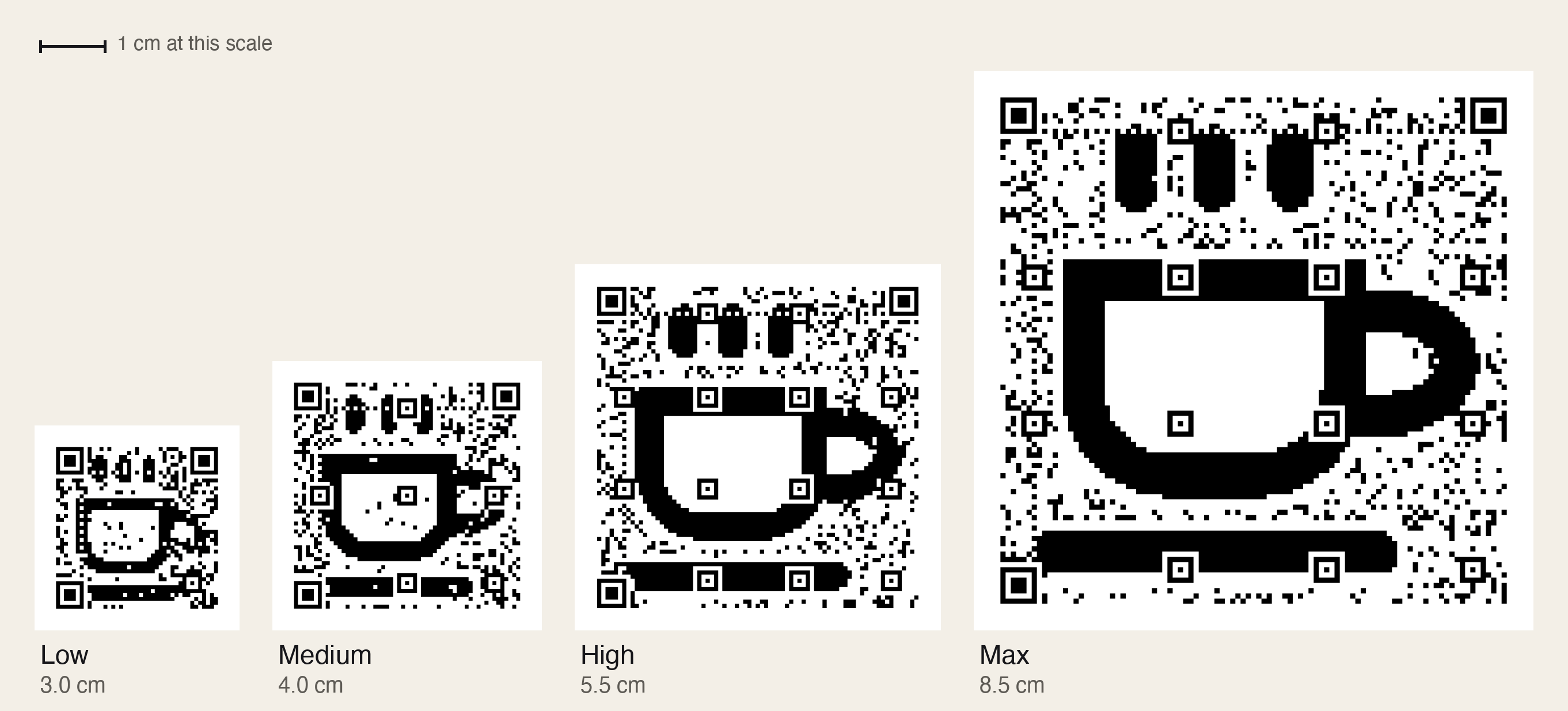
Settings used: Our own outlined cup as the picture, Fit: Whole picture. Style: Classic. Keep the logo or face exact: on. Picture or safety: Balanced. Quality: Better (Pro). Detail: Low, Medium, High and Max in turn. Each code holds the link paintqr.com. Download the cup picture

| Detail | Squares across, with margin | Plain code | Picture code | Picture code fits on |
|---|---|---|---|---|
| Low | 49 | 2.0 cm | 3.0 cm | A business card, a jar label |
| Medium | 65 | 3.0 cm | 4.0 cm | A postcard, a table tent |
| High | 85 | 3.5 cm | 5.5 cm | A flyer, a menu cover |
| Max | 105 | 4.5 cm | 8.5 cm (estimate) | A large poster read up close |
On a business card
A business card is about 85 to 90 mm by 50 to 55 mm. A code that saves your contact details into the phone holds more than a link: with a name and one more field, a picture code needs Medium and 4 cm. With name, phone and email it needs High and 5.5 cm, the whole short side of a 55 mm card, as on the right-hand card in the picture, which holds five fields at High. A job title as well, or long entries, need Max and 8.5 cm.
So on a standard card, keep a contact code to a name and one way to reach you, or print a code that opens your contact page, as on the left-hand card: 3 cm at Low detail, 4 cm at Medium. It opens a web page and does not save the contact.
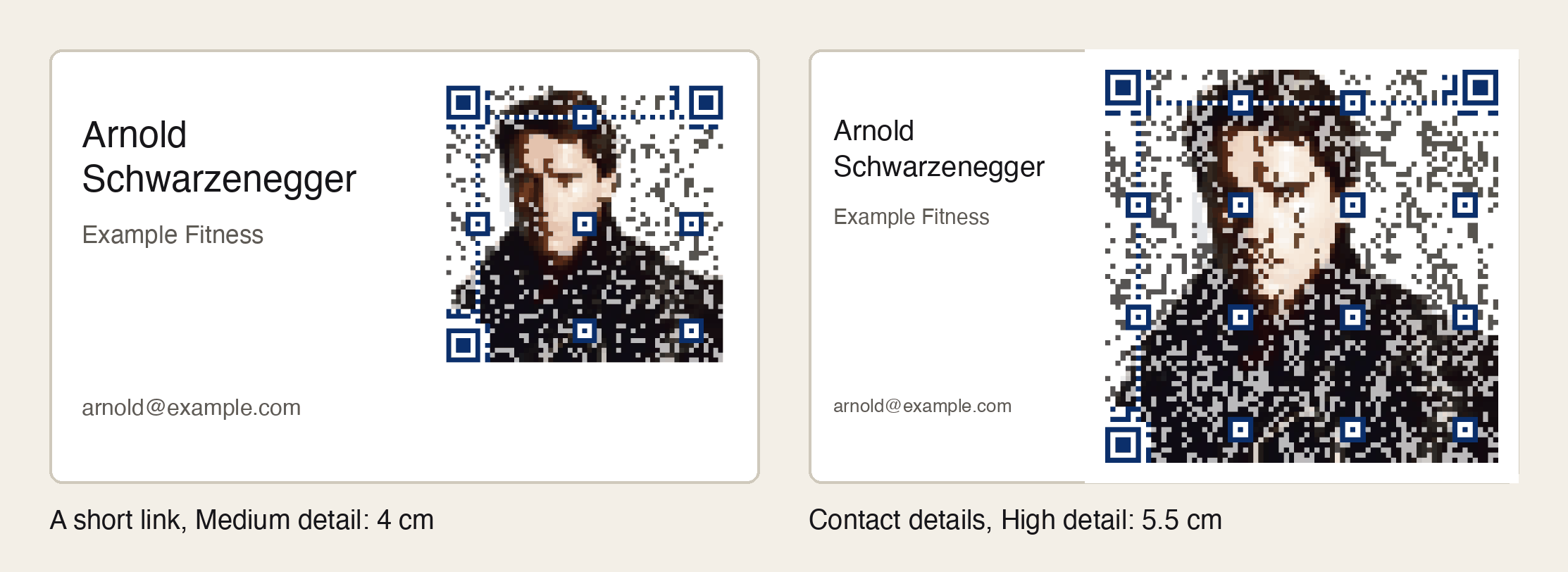
Settings used: A half-length portrait photo, Fit: Crop to square. Style: Colour. Keep the logo or face exact: on. Picture or safety: Cleaner picture. Quality: Standard. Left card: a short link, Detail: Medium. Right card: contact details (name, company, phone, email, website), Detail: High.
Fine picture
For photographs, the maker's 'Fine picture' option draws each square as a small dot. These designs get larger minimums, all estimates: 4.5, 6, 8 and 9.5 cm from Low to Max.
Codes read from a distance
For a code read from a metre or more, a common rule of thumb, which our tests did not measure, is a width of one tenth of the distance: 10 cm for a metre. It assumes Low or Medium detail, so choose one of those for a sign. Use the larger of this width and the table's.
Before a print run
Print one copy at the final size, on the final paper, and scan it with two different phones. Gloss reflects light into the camera, and textured paper softens the squares. Of the maker's downloads, the PDF is print-ready at the stated size, so print it at 100 %, and the SVG stays sharp when enlarged. Neither may be printed below the minimum.
Mind the printer as well: a square should be several printer dots wide, and at 0.4 mm it is fewer than five on a printer of 300 dots per inch and about three on a label printer (203). On a printer that coarse, print larger than the minimum and test on that printer. On a jar or a bottle, test on the curve, not on flat paper.